


It was just a glimpse, two 8-second Veo 3 videos, but as with so many life-altering things, I’ll never forget my first time generating synchronized audio and video with one deftly crafted prompt.
I’m currently running Google AI Pro, the $19.99 a month account that gives you access to the Gemini 2.5 Pro model and, more importantly, a limited trial of Veo 3 video generation.
Veo 3 is the tipping-point level of generative video creation that, for the first time, makes it possible to create videos with dialogue, background noises and sound effects, all synced to the action.
You may like
While I understood that my Veo 3 access might be limited, I wasn’t sure how many videos I could generate with the new model. The answer, it seems, is exactly two. If I want unlimited access, I can switch to Google AI Ultra for an eye-watering $249.99 a month (there’s a three-month deal for $124.99 a month). And Veo 3 is currently US-only.
Since Veo 3 launched at Google I/O 2025, my TikTok feed has been filled with these incredible and often quite realistic AI clips. Some look like infomercials or commercials, others are just impossible, like a woman interviewing a smiling man who is clearly on fire.
I was torn between creating realism, hyper-realism, and something fantastic. In the end, I built a prompt in the Gemini 2.5 Pro window that supports video creation that was a mix of sci-fi, drama, and whimsy.
Writing inside the prompt window, though, turned out to be a mistake because I accidentally hit return before fully fleshing out my idea, and suddenly Veo 3 was busy generating my video.
This was my first prompt:
“Bill and Jessica live in a log cabin built on the surface of Mars. Bill emerges from the cabin to find jessica fighting a martian using nothing but a stuffed animal.
Bill screams at Jessica: What are you doing?
Jessica: This damn martian wants our land and he can’t have it.”
As you can see, there isn’t much detail, and as easy as it is to generate a video in Veo 3 (and the audio-free Veo 2), you’ll get a better result by including more detail and dialogue. Veo 3 will not have the characters say anything you didn’t script. In this case, because I hit return too soon, Jessica’s dialogue is cut off and I didn’t get to polish my prompt.
Even so, Veo 3 took the scant details and in roughly 5 minutes created a striking piece of video. Take a look (sound up for the full effect).
It’s far from perfect. Bill doesn’t actually speak his line, though we hear it from off-camera. Jessica’s scream (or is it the Martian’s?) also comes from somewhere off camera.
There’s an unfortunate sound effect that might be coming from Bill, and that I did not script. Also, I don’t know why Jessica speaks her lines directly to camera.
Again, I assume that had I directed who she should be talking to, Veo 3 might have made a different choice.
Still, there are so many more subtle things that are impressive. Veo 3 gets the setting right; notice the reddish overcast of Mars daylight. The Martian is terrifying. I’m more impressed, though, by the sound effects like the sound of the cabin door, footfalls on the Martian soil, and the sound of the stuffed animal hitting the Martian’s chest.
Take 2
For my second prompt, I wrote and edited it outside of Gemini. I did my best to set the scene, describe the characters, and delineate the dialogue and any sound effects. Here’s the prompt:
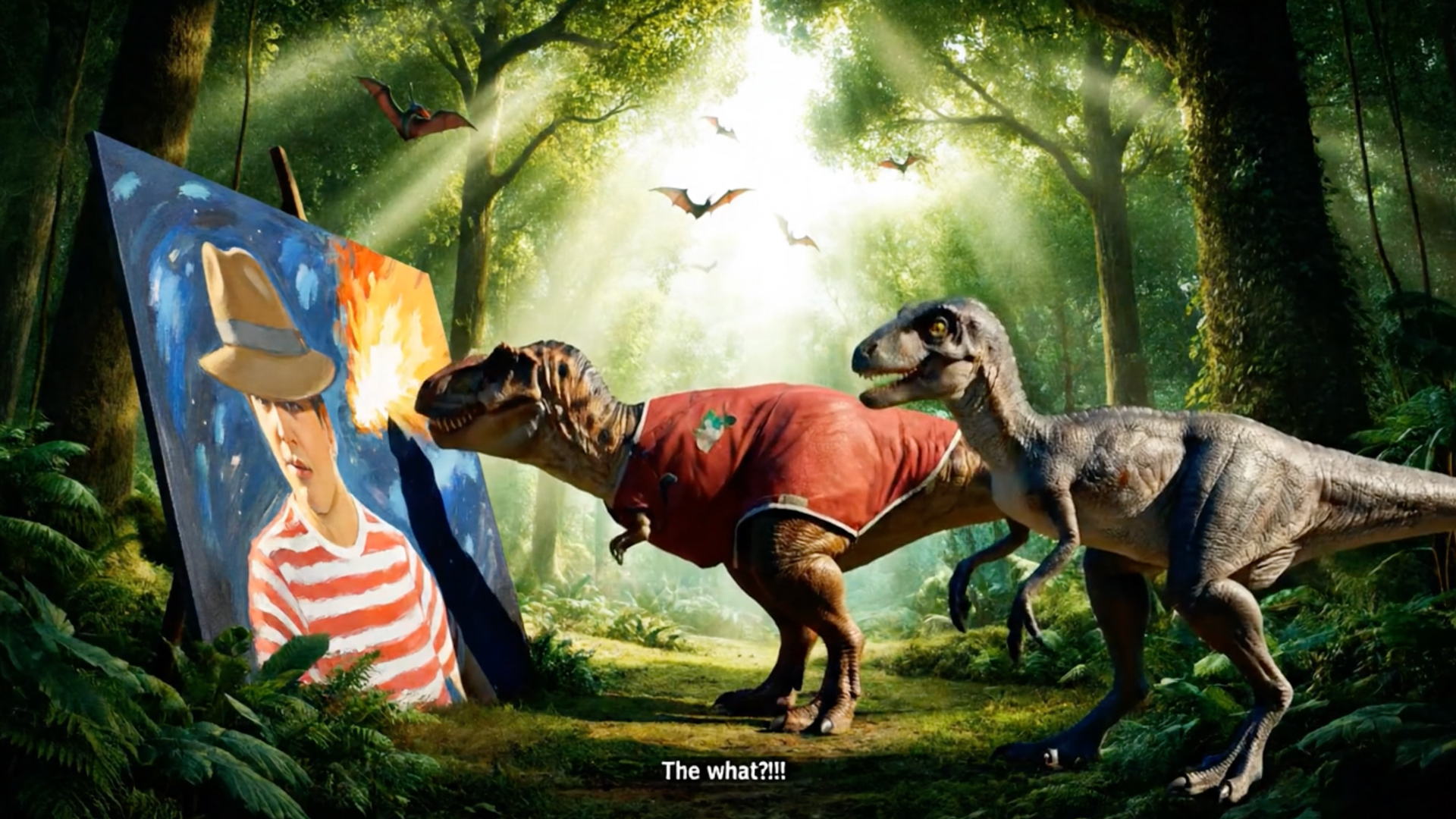
The scene is a lush forest with sunlight streaming in from overhead. We hear the shrieks of pterodactyls in the background and the sound of leaves swaying in a light breeze.
A Tyrannosaurus is carefully painting a large canvas that depicts a colorful image of a man about to be destroyed by an asteroid.
The Tyrannosaurus is quietly singing to himself, “Pink Pony Club, I’m gonna keep on dancing at the…”
A Velociraptor wanders over and asks, “Why are you painting that?”
The Tyrannosaurus: “The AI made me do it.”
The Velociraptor backs away in horror and says, “The what?!!”
As you can see, I was, in part, inspired by some of the self-referential Veo 3 videos I’d been seeing on TikTok where the characters break the fourth wall and mention they’re AIs in a video. While my detail work mostly paid off, Veo did make a number of questionable choices.
I don’t know why it chose to dress the T-Rex but neglected to give him a paintbrush, or why the character in the painting looks like some sort of 1970s kid detective. And while Gemini clearly knows a thing or two about what dinosaurs look like, it got the relative sizes of the T-Rex and Velociraptor all wrong. I was also disappointed that instead of “shrieks of pterodactyls,” I got a static image of pterodactyls and the sound of birdsong in the background.
The dialogue sync is mostly good, though I was hoping for more emoting from the velociraptor.
Overall, it took me a few minutes to write these prompts and another 3-to-5 minutes for Veo 3 to generate each video. I believe that if I spent more time painting a detailed picture, even writing a whole short story, I might get an even better result.
I’d let you know for sure, but I just ran my brief trial dry. If you plan on attending a couple of Veo 3 videos, here are my core tips:
- Write your prompt outside of Gemini
- Choose your topics carefully
- Spell out every detail, from the look of the characters to the scene
- Detail every action, or Veo 3 will make something up or have a character doing nothing
- Spell out the dialogue so it’s clear.
- Describe the emotion behind dialogue delivery
- Include details on background noises
- Include sound effect descriptions if you desire specific sounds
- Each video is 8 seconds maximum. Plan accordingly
- Try creating multiple videos that continue a storyline, but keep descriptions consistent
Good luck with your Veo 3 test drives. Let me know how it goes in the comments below.
