

Close Menu
TechurzTechurz
    What's Hot

    Kog is going deeper to squeeze more inference out of GPUs

    August 14, 2026

    Investors sue Selena Gomez alleging fraud tied to her mental health startup

    August 13, 2026

    Databricks wanted to raise $1B, investors wanted $15B. It settled on $5B at a $190B valuation.

    August 13, 2026
    X (Twitter) Pinterest YouTube LinkedIn WhatsApp
    Tech Pulse
    • Kog is going deeper to squeeze more inference out of GPUs
    • Investors sue Selena Gomez alleging fraud tied to her mental health startup
    • Databricks wanted to raise $1B, investors wanted $15B. It settled on $5B at a $190B valuation.
    • Why Sandbar thinks it’s voice-enabled ring can avoid the AI hardware graveyard
    • How a $250 million acquisition collapsed into allegations of fraud and forged signatures
    X (Twitter) Pinterest YouTube LinkedIn WhatsApp
    TechurzTechurz
    • Home
    • Tech Pulse
    • Future Tech
    • AI Systems
    • Cyber Reality
    • Disruption Lab
    • Signals
    TechurzTechurz
    Home - Apps - iOS 26 beta 5 fixes one of the most annoying Camera app changes
    Apps

    iOS 26 beta 5 fixes one of the most annoying Camera app changes

    TechurzBy TechurzAugust 5, 2025Updated:May 11, 2026No Comments2 Mins Read
    Share Facebook Twitter Pinterest LinkedIn Tumblr Reddit Telegram Email
    Camera app iOS 26
    Share
    Facebook Twitter LinkedIn Pinterest Email


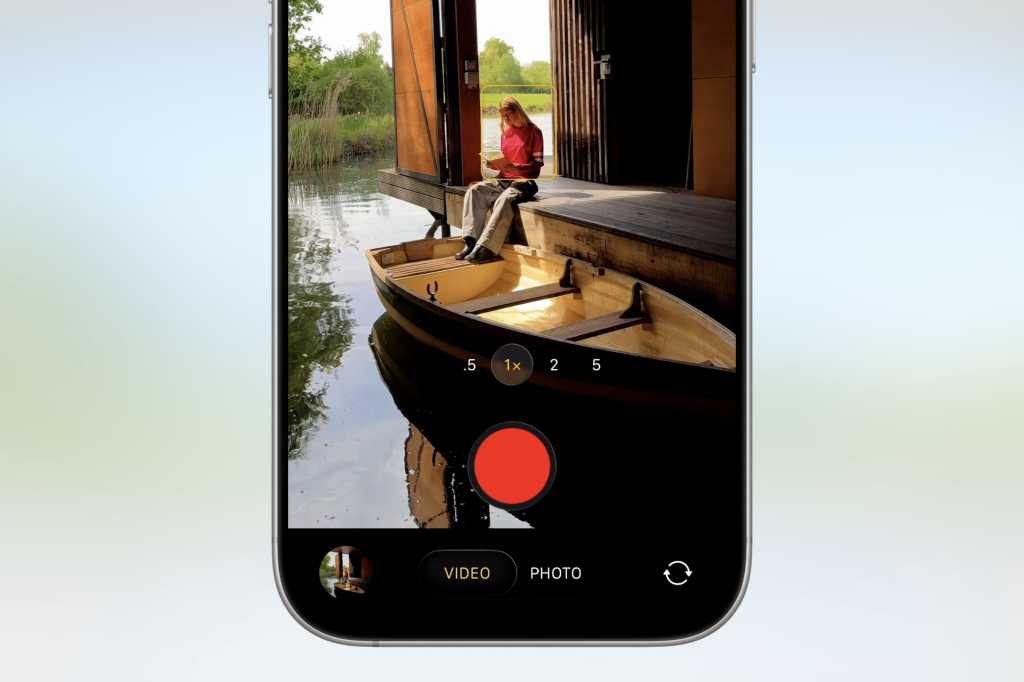
    With the fifth beta of iOS 26, Apple has changed an important behavior of the Camera app for long-time iPhone users. Essentially, the company has reversed the direction of the swipe gesture to switch between camera modes, such as Video, Photo, and Panorama.

    As some users were upset by the change, Apple has now fixed this with the latest beta of iOS 26.

    Classic Mode Switching

    The fifth beta of iOS 26, which was released on Tuesday to developers, adds an option in the Settings app that lets users choose the direction of the swipe gesture in the Camera app. By default, the app will enable the new gesture, which goes left when you swipe left and right when you swipe right.

    By enabling the new β€œClassic Mode Switching” option, users can reverse the scroll direction from swiping right to going left and vice versa, just like in iOS 18.

    It’s not exactly a big change, of course, but it’s notable that Apple is responding to criticism by letting users choose which behavior they prefer, rather than forcing the new way on everyone. The company did the same for Safari in iOS 26, as users can choose whether they want the new compact interface or the classic one, which shows more buttons on the screen.

    Apart from that, today’s update also brings another round of minor tweaks to the Liquid Glass interface, as well as letting iPad users run older apps in full screen when they’re not optimized for the latest models.

    iOS 26 is currently available in beta, with the official release expected in September. Users interested in trying out the new version before its release can join the Apple Beta Program.

    annoying app Beta camera fixes iOS
    Share. Facebook Twitter Pinterest LinkedIn Tumblr Email
    Previous ArticleThese 5 Streaming Services Offer the Best Value of All
    Next Article TSMC-Mitarbeiter unter Spionageverdacht festgenommen | CSO Online
    Techurz
    • Website

    Related Posts

    Opinion

    Meet Wrinkles, an AI app that uncovers the hidden stories of the places around you

    August 4, 2026
    Opinion

    Reelful’s AI turns your camera roll into short-form videos for social media

    July 15, 2026
    Opinion

    Savi’s app aims to protect consumers from realistic AI scams like kidnappers demanding ransom

    July 7, 2026
    Add A Comment
    Latest Tech Pulse

    College social app Fizz expands into grocery delivery

    September 3, 20252,290

    12 Father’s Day E-Card Sites That Are Actually Good

    June 4, 202523

    SolarSquare in talks to raise up to $60M as India’s rooftop solar market draws major VC interest

    May 23, 202622
    Stay In Touch
    • YouTube
    • WhatsApp
    • Twitter
    • Pinterest
    • LinkedIn

    Techurz helps readers stay ahead of digital change with clear, practical, future focused technology intelligence written today,searched tomorrow.

    X (Twitter) Pinterest YouTube LinkedIn WhatsApp
    Company
    • About Us
    • Contact Us
    • Our Authors / Editorial Team
    • Write For Us
    • Advertise
    Policy
    • Editorial Policy
    • Privacy Policy
    • Terms and Conditions
    • Affiliate Disclosure
    • Cookie Policy
    • Disclaimer
    • DMCA
    Explore
    • AI Systems
    • Cyber Reality
    • Future Tech
    • Disruption Lab
    • Signals
    • Tech Pulse
    • Sitemap

    Join the Techurz Brief

    The future does not arrive suddenly.
    Stay ahead with fast, sharp tech signals.

    Type above and press Enter to search. Press Esc to cancel.