

Close Menu
TechurzTechurz

    Subscribe to Updates

    Get the latest creative news from FooBar about art, design and business.

    What's Hot

    Walmart-owned Flipkart, Amazon are squeezing India’s quick commerce startups

    April 12, 2026

    Kalshi wins temporary pause in Arizona criminal case

    April 11, 2026

    Final 24 hours: Save up to $500 on your Disrupt 2026 pass

    April 10, 2026
    Facebook X (Twitter) Instagram
    Trending
    • Walmart-owned Flipkart, Amazon are squeezing India’s quick commerce startups
    • Kalshi wins temporary pause in Arizona criminal case
    • Final 24 hours: Save up to $500 on your Disrupt 2026 pass
    • This founder helped build SpaceX’s most powerful rocket engine. Now he’s building a ‘fighter jet for orbit.’
    • What founders can learn from Anjuna’s layoffs and recovery
    • After data breach, $10B valued startup Mercor is having a month
    • Sierra’s Bret Taylor says the era of clicking buttons is over
    • Final 2 days to save up to $500 on your Disrupt 2026 ticket
    Facebook X (Twitter) Instagram Pinterest Vimeo
    TechurzTechurz
    • Home
    • AI
    • Apps
    • News
    • Guides
    • Opinion
    • Reviews
    • Security
    • Startups
    TechurzTechurz
    Home»Apps»macOS 16’s new Magnifier app uses an iPhone to see far-away objects up close
    Apps

    macOS 16’s new Magnifier app uses an iPhone to see far-away objects up close

    TechurzBy TechurzMay 14, 2025No Comments3 Mins Read
    Share Facebook Twitter Pinterest LinkedIn Tumblr Reddit Telegram Email
    macOS 16's new Magnifier app uses an iPhone to see far-away objects up close
    Share
    Facebook Twitter LinkedIn Pinterest Email


    Apple on Tuesday announced several new Accessibility features coming to macOS later this year. The features will be part of macOS 16, which will be revealed at WWDC25 on June 9.

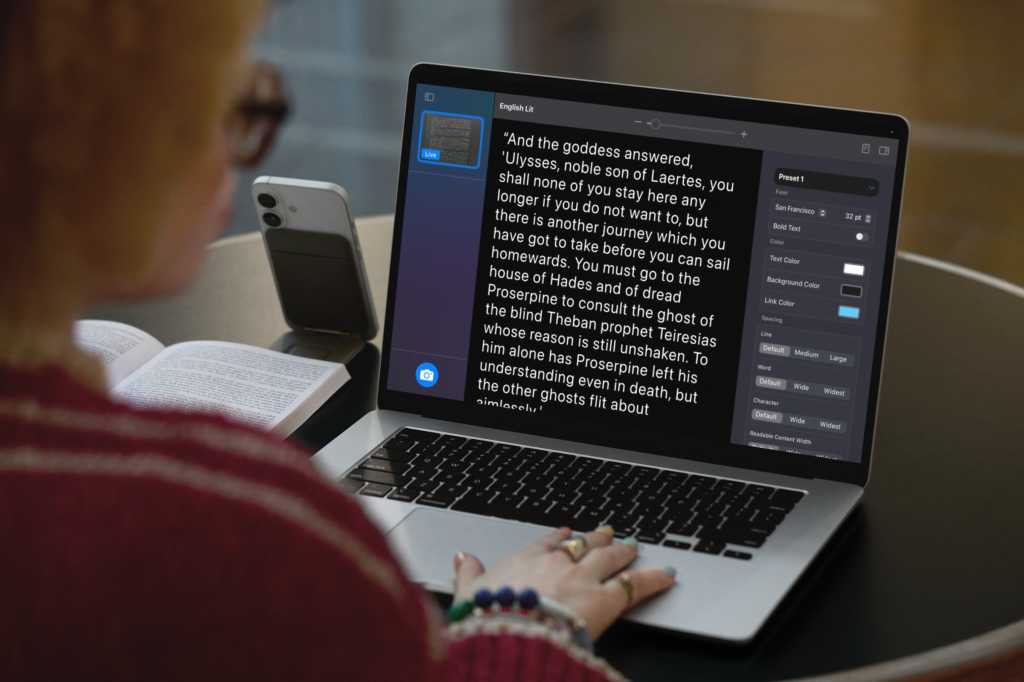
    The features are highlighted by a new Magnifier app with Continuity Camera functionality. Mac users are already familiar with Continuity Camera and its ability to use the iPhone’s camera as a webcam. Now, with the Magnifier app, a Mac can use the iPhone camera (or any other USB camera) to view the surroundings and zoom in.

    For example, users in a lecture hall can use the Magnifier app and iPhone camera to get a closer look at a whiteboard at the front of the room. The Magnifier will also be able to display multiple live session windows where a user can watch a presentation and follow along in a book at the same time using Desk View. Brightness, contrast, color filters, and perspective are adjustable, and views can be captured, grouped, and saved to add to at a later time.

    The new Accessibility Reader is a system-wide feature for making text easier to read. Text can be customized for color, font, and spacing, and users can also switch to Spoken Content. Since Accessibility Reader is system-wide, it can be used in any app, including the new Magnifier.

    Other new Accessibility features coming to macOS 16 include:

    • Braille Access: Users can use a built-in app launcher to open any app by typing with Braille Screen Input or a connected Braille device. Braille Access lets users take notes in Braille and do calculations using Nemeth Braille. Braille Ready Format (BRF) files can be opened directly from Braille Access. Live Captions integration lets users transcribe conversations directly on braille displays.
    • Background Sounds: Can be personalized with new EQ settings, playback duration times, and new actions for automations in Shortcuts.
    • Personal Voice: Uses on-device machine learning and artificial intelligence for a smoother, more natural-sounding voice. Support for Mexican Spanish will also be available.
    • Vehicle Motion Cues: Available in the iPhone and coming to the Mac, this feature can help reduce motion sickness when riding in a moving vehicle by displaying animated dots that correspond to a vehicle’s movements.

    Vehicle Motion Cues can help prevent motion sickness for those times you’re using your Mac as a passenger on a bus, train, or car.

    Apple

    Apple is also updating iOS 19 and iPadOS 19 with several new Accessibility features. Apple often takes the opportunity to showcase new Accessibility features about a month before the WWDC keynote. Last year, the company highlighted Eye Tracking, Music Haptics, and other features in iOS 18.

    16s app close faraway iPhone macOS Magnifier objects
    Share. Facebook Twitter Pinterest LinkedIn Tumblr Email
    Previous ArticleApple partners with a brain-computer startup to turn thoughts into device control
    Next Article Google’s ‘I’m feeling lucky’ button might soon be replaced by AI mode
    Techurz
    • Website

    Related Posts

    Opinion

    Digg lays off staff and shuts down app as company retools

    March 13, 2026
    Opinion

    MyFitnessPal has acquired Cal AI, the viral calorie app built by teens

    March 2, 2026
    Opinion

    Jest, a marketplace for messaging games, is challenging the app store status quo

    February 26, 2026
    Add A Comment
    Leave A Reply Cancel Reply

    Top Posts

    College social app Fizz expands into grocery delivery

    September 3, 20252,288 Views

    A Former Apple Luminary Sets Out to Create the Ultimate GPU Software

    September 25, 202516 Views

    The Reason Murderbot’s Tone Feels Off

    May 14, 202512 Views
    Stay In Touch
    • Facebook
    • YouTube
    • TikTok
    • WhatsApp
    • Twitter
    • Instagram
    Latest Reviews

    Subscribe to Updates

    Get the latest tech news from FooBar about tech, design and biz.

    Most Popular

    College social app Fizz expands into grocery delivery

    September 3, 20252,288 Views

    A Former Apple Luminary Sets Out to Create the Ultimate GPU Software

    September 25, 202516 Views

    The Reason Murderbot’s Tone Feels Off

    May 14, 202512 Views
    Our Picks

    Walmart-owned Flipkart, Amazon are squeezing India’s quick commerce startups

    April 12, 2026

    Kalshi wins temporary pause in Arizona criminal case

    April 11, 2026

    Final 24 hours: Save up to $500 on your Disrupt 2026 pass

    April 10, 2026

    Subscribe to Updates

    Get the latest creative news from FooBar about art, design and business.

    Facebook X (Twitter) Instagram Pinterest
    • About Us
    • Contact Us
    • Privacy Policy
    • Terms and Conditions
    • Disclaimer
    © 2026 techurz. Designed by Pro.

    Type above and press Enter to search. Press Esc to cancel.