

Close Menu
TechurzTechurz
    What's Hot

    IQM, Europe’s first public quantum company, admits the future of the tech is uncertain

    July 2, 2026

    Indian tech tycoon bets $30M of his own money to build AI alternative to Microsoft Office

    July 2, 2026

    Bending Spoons defies SaaS slump, surges 40% on first day of trading

    July 1, 2026
    X (Twitter) Pinterest YouTube LinkedIn WhatsApp
    Tech Pulse
    • IQM, Europe’s first public quantum company, admits the future of the tech is uncertain
    • Indian tech tycoon bets $30M of his own money to build AI alternative to Microsoft Office
    • Bending Spoons defies SaaS slump, surges 40% on first day of trading
    • Humble Robotics’ CEO says the tech finally caught up to the vision for autonomous vehicles
    • Autonomous vehicle hype is back, and Humble Robotics is bringing it to freights
    X (Twitter) Pinterest YouTube LinkedIn WhatsApp
    TechurzTechurz
    • Home
    • Tech Pulse
    • Future Tech
    • AI Systems
    • Cyber Reality
    • Disruption Lab
    • Signals
    TechurzTechurz
    Home - Apps - This Terminal trick brings back Launchpad on macOS 26
    Apps

    This Terminal trick brings back Launchpad on macOS 26

    TechurzBy TechurzJuly 11, 2025No Comments3 Mins Read
    Share Facebook Twitter Pinterest LinkedIn Tumblr Reddit Telegram Email
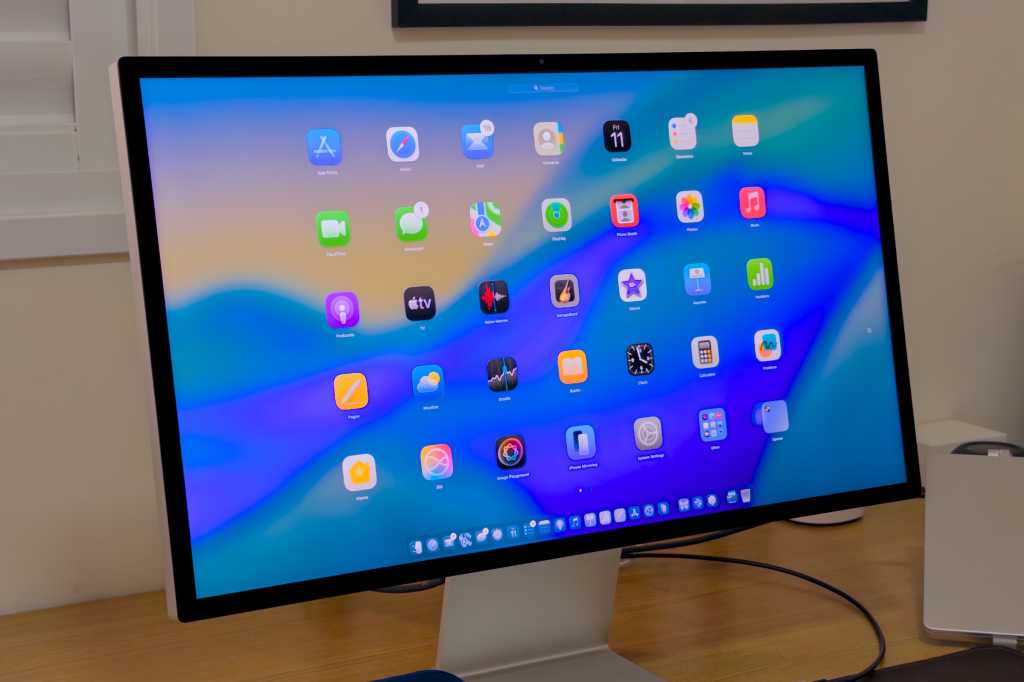
    Launchpad on a Mac
    Share
    Facebook Twitter LinkedIn Pinterest Email


    Apple last month announced macOS 26 Tahoe, the next major update to the Mac operating system. While it comes with a lot of new features, including the Liquid Glass interface, Live Activities, and a powerful new Spotlight, the update also killed off a feature that has lived on the Mac for over a decade.

    With macOS 26, Apple replaced Launchpad with a new app launcher integrated with Spotlight. But if you’re like me and miss Launchpad, there’s a way to bring it back.

    For those unfamiliar, Launchpad on the Mac is essentially a “home screen” that shows all the apps you have installed, just like on the iPhone and iPad. It was introduced with OS X Lion in 2010 at a time when Apple wanted to bring more of the iPad experience to the Mac.

    While some users never got used to having Launchpad on their Mac, I always liked having a way to organize my apps the way I wanted. For instance, Launchpad lets me create multiple pages and place apps in folders, so I don’t need to remember the name of an app I rarely use; I just need to remember where it is in Launchpad.

    But macOS 26 has changed that, as the list of apps is now integrated into Spotlight, so you need to search for everything. While the new interface is certainly more minimalist, it doesn’t let users organize apps the way they want.

    The new Spotlight is so powerful that it replaces Launchpad on your Mac.

    Apple

    How to bring Launchpad back in macOS 26

    Luckily, there’s a way to reverse this, at least for now. If you’re running the macOS 26 beta on your Mac and want Launchpad back, just follow these steps. A word of warning: Messing with commands in Terminal, especially the sudo (superuser do) command, is not something casual users should do, as it could cause issues to your machine and require a reinstallation of the OS. And we recommend backing up your files before installing a beta for the same reason.

    1. Open the Terminal app inside Applications > Utilities.
    2. Write the following command and hit Return: sudo mkdir -p /Library/Preferences/FeatureFlags/Domain
    3. Enter your Mac’s password and press Return (you must be logged into an admin account)
    4. Write the following command and hit Return: sudo defaults write /Library/Preferences/FeatureFlags/Domain/SpotlightUI.plist SpotlightPlus -dict Enabled -bool false
    5. Reboot your Mac

    Once you’ve done that, you’ll be able to use Launchpad again in macOS 26 beta. However, this command also brings back the old Spotlight experience without the enhancements introduced with macOS 26, such as clipboard history and integration with the Shortcuts app.

    If you want to revert to the new Spotlight (and consequently disable Launchpad), redo all the same steps above but enter the following command instead:

    sudo defaults write /Library/Preferences/FeatureFlags/Domain/SpotlightUI.plist SpotlightPlus -dict Enabled -bool true

    Keep in mind that while this trick works on macOS 26 beta 3, Apple might break it in future versions of macOS. macOS 26 will be released to the public this fall. A public beta is expected to be available in the next few days.

    brings Launchpad macOS Terminal Trick
    Share. Facebook Twitter Pinterest LinkedIn Tumblr Email
    Previous ArticlePerplexity’s New AI-First Browser Is Kicking Off Agentic Applications
    Next Article The great AI agent acceleration: Why enterprise adoption is happening faster than anyone predicted
    Techurz
    • Website

    Related Posts

    Opinion

    The pitch trick that helped an eSports startup raise $20M when VCs only wanted AI

    May 25, 2026
    Opinion

    Gusto hits $1B revenue, a figure that brings it closer to public markets

    May 7, 2026
    Opinion

    Phictly’s new app brings people together over their favorite books and TV shows

    November 21, 2025
    Add A Comment
    Latest Tech Pulse

    College social app Fizz expands into grocery delivery

    September 3, 20252,290

    12 Father’s Day E-Card Sites That Are Actually Good

    June 4, 202523

    SolarSquare in talks to raise up to $60M as India’s rooftop solar market draws major VC interest

    May 23, 202622
    Stay In Touch
    • YouTube
    • WhatsApp
    • Twitter
    • Pinterest
    • LinkedIn

    Techurz helps readers stay ahead of digital change with clear, practical, future focused technology intelligence written today,searched tomorrow.

    X (Twitter) Pinterest YouTube LinkedIn WhatsApp
    Company
    • About Us
    • Contact Us
    • Our Authors / Editorial Team
    • Write For Us
    • Advertise
    Policy
    • Editorial Policy
    • Privacy Policy
    • Terms and Conditions
    • Affiliate Disclosure
    • Cookie Policy
    • Disclaimer
    • DMCA
    Explore
    • AI Systems
    • Cyber Reality
    • Future Tech
    • Disruption Lab
    • Signals
    • Tech Pulse
    • Sitemap

    Join the Techurz Brief

    The future does not arrive suddenly.
    Stay ahead with fast, sharp tech signals.

    Type above and press Enter to search. Press Esc to cancel.