

Close Menu
TechurzTechurz
    What's Hot

    The Future of AI Systems: 7 Architectural Shifts Driving the AI Revolution

    June 13, 2026

    Andrew Yang thinks the next big startup opportunity is lowering the cost of living

    June 13, 2026

    Theker just raised $85M to build the factory robot that doesn’t specialize in anything

    June 12, 2026
    X (Twitter) Pinterest YouTube LinkedIn WhatsApp
    Tech Pulse
    • The Future of AI Systems: 7 Architectural Shifts Driving the AI Revolution
    • Andrew Yang thinks the next big startup opportunity is lowering the cost of living
    • Theker just raised $85M to build the factory robot that doesn’t specialize in anything
    • Bluesky launches group chats, as company shifts focus to community features
    • Quantum Space’s military SPAC is trying to catch SpaceX’s IPO wave
    X (Twitter) Pinterest YouTube LinkedIn WhatsApp
    TechurzTechurz
    • Home
    • Tech Pulse
    • Future Tech
    • AI Systems
    • Cyber Reality
    • Disruption Lab
    • Signals
    TechurzTechurz
    Home - Apps - macOS Tahoe: Apps replaces Launchpad
    Apps

    macOS Tahoe: Apps replaces Launchpad

    TechurzBy TechurzJuly 25, 2025Updated:May 11, 2026No Comments3 Mins Read
    Share Facebook Twitter Pinterest LinkedIn Tumblr Reddit Telegram Email
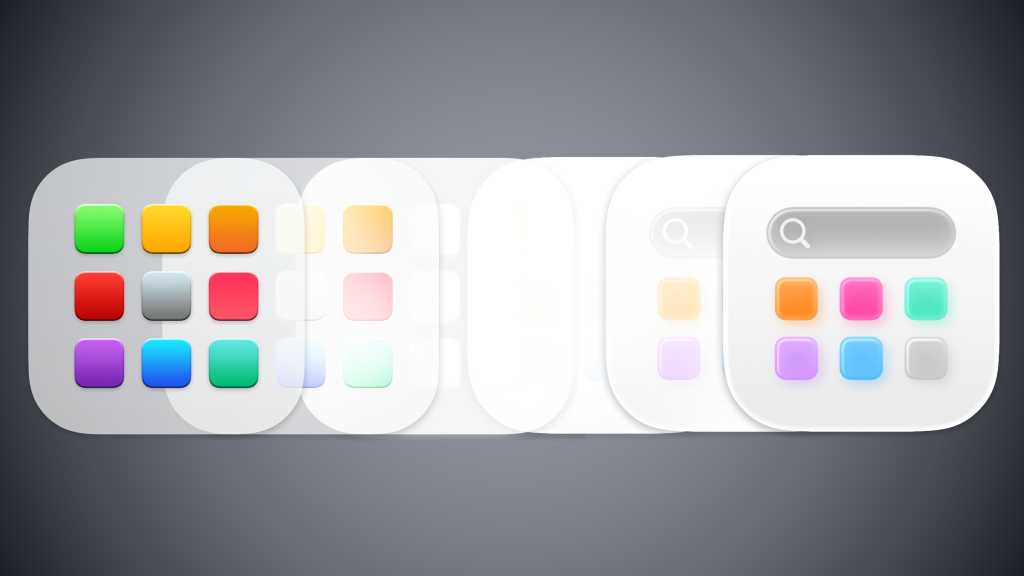
    macOS Tahoe Launchpad to Apps transition
    Share
    Facebook Twitter LinkedIn Pinterest Email


    Launchpad has been a part of the Mac operating system since OS X Lion, which was released in 2011. After 14 years, Launchpad is being retired, replaced by Apps in macOS Tahoe.

    Apps functions a lot like Launchpad as a way to essentially access your Applications folder, but it has a new look and doesn’t allow for any customization. You can view your apps either by Category or by Name, and then display the apps either as Icons or in a List. That’s it. A list of Suggestions at the top is based on your recent activity.

    The old Launchpad apps screen (left) and macOS 26 Tahoe’s new Apps screen.

    Launchpad was one of Apple’s first attempts to unify UI elements between the Mac and iPhone operating systems. Launchpad basically brought the iPhone Home screen to the Mac–they worked in the same way. With Launchpad, you could customize different pages filled with apps, such as a page dedicated to video editing tools or games. You can also create folders of apps that are displayed on a Launchpad page. You can’t do any of that in Tahoe’s Apps.

    When you launch macOS Tahoe, you’ll find the Apps icon sitting in the Dock where Launchpad used to be. Because of the way Apps displays your apps, however, you might find it more difficult to get to the app you want. You may need to do some scrolling to get to the proper category, and you may need to click Show More if your app doesn’t appear. You’re better off typing the name of the app into the search bar at the top of the Apps window.

    Of course, you can still open the Applications folder in the Finder in Tahoe. When in the Finder, you can navigate to the Applications folder or press Shift+Command+A, or launch apps via Spotlight.

    Launchpad still exists in the Tahoe beta, but only in spirit. If you do a search (Command+F; it won’t work with Spotlight/Command+spacebar) on “Launchpad,” a Launchpad icon appears as a result. You can click to open it, but Apps launches instead. You can Control+click and select Show in Enclosing Folder, and it will appear dimmed in the Applications folder–if you open the Applications folder in any other instance, you won’t see it. This phantom Launchpad may be an alias in place to maintain the integrity of scripts and other items that refer to Launchpad.

    If you want to bring back Launchpad, you can fiddle with Terminal commands, but we recommend using extreme caution. You’re basically overriding the system to replace the Apps app, and in my experience, it also disables Spotlight. And while this trick works in the Tahoe beta, it’s possible it may stop working eventually.

    apps Launchpad macOS replaces Tahoe
    Share. Facebook Twitter Pinterest LinkedIn Tumblr Email
    Previous ArticleTikTok reacts to alleged shoplifter detained after 7 hours in Illinois Target
    Next Article AI-forged panda images hide persistent cryptomining malware ‘Koske’
    Techurz
    • Website

    Related Posts

    Opinion

    Beyond Instagram: Introducing the next generation of social apps

    June 6, 2026
    Opinion

    Meet Gizmo: A TikTok for interactive, vibe-coded mini apps

    February 4, 2026
    Opinion

    The rise of ‘micro’ apps: non-developers are writing apps instead of buying them

    January 16, 2026
    Add A Comment
    Latest Tech Pulse

    College social app Fizz expands into grocery delivery

    September 3, 20252,289

    SolarSquare in talks to raise up to $60M as India’s rooftop solar market draws major VC interest

    May 23, 202621

    Future of Digital Privacy and Security: 7 Truths Nobody Tells You

    May 25, 202618
    Stay In Touch
    • YouTube
    • WhatsApp
    • Twitter
    • Pinterest
    • LinkedIn

    Techurz helps readers stay ahead of digital change with clear, practical, future focused technology intelligence written today,searched tomorrow.

    X (Twitter) Pinterest YouTube LinkedIn WhatsApp
    Company
    • About Us
    • Contact Us
    • Our Authors / Editorial Team
    • Write For Us
    • Advertise
    Policy
    • Editorial Policy
    • Privacy Policy
    • Terms and Conditions
    • Affiliate Disclosure
    • Cookie Policy
    • Disclaimer
    • DMCA
    Explore
    • AI Systems
    • Cyber Reality
    • Future Tech
    • Disruption Lab
    • Signals
    • Tech Pulse
    • Sitemap

    Join the Techurz Brief

    The future does not arrive suddenly.
    Stay ahead with fast, sharp tech signals.

    Type above and press Enter to search. Press Esc to cancel.