


At a glance
Expert’s Rating
Pros
- Apps, links, and folders easily accessible at the click of a mouse
- Mini alternative to the Dock
- Control your Mac like in the old days
Cons
- Display of the individual buttons does not work well
- A lot of manual work required for setup
- Sometimes fades out when other apps are in the foreground
Our Verdict
The Control Strip from classic Mac OS has long since had its day, but with RetroStrip gives it a new lease of life in macOS.
Price When Reviewed
This value will show the geolocated pricing text for product undefined
Best Pricing Today
Best Prices Today: RetroStrip
MOTORCYCL3/J. Blake Harris
Free
Question for classic Mac users who go way back to System 6 or 7: Remember the Control Strip, which gave you direct access to various applications or functions at the click of a mouse? It was released in 1994 with System 7.1, with the PowerBook 500 series the PowerBook Duo 280 computers. With System 7.5.3, it was made available to all Macintoshes.
Control Strip was a very useful tool, as it allowed settings such as volume, screen resolution, color depth, and much more to be adjusted at the click of a mouse. It was relatively extensively configurable and could be quickly switched on and off. But with the advent of the Dock in Mac OS X, the control bar became superfluous, because the Dock allows direct access to numerous applications, files, or folders.
Screenshot
IDG
However, the Dock also takes up screen space, which is why there is an option to automatically hide the Dock and only make it appear briefly when you move the pointer to an edge of your display. That’s how I do it on my Mac, and in practice, I hardly ever see the Dock. I like Alfred 5 as a app launcher (it does a lot more, but that’s what I mainly use it for). I find it quite practical and nostalgically beautiful to have such a small control bar for certain frequently used apps permanently floating in the foreground without being intrusive. This is exactly what RetroStrip offers.
Comprehensive customization options
You can take existing buttons with links and assign them to other destinations such as websites, folders, or apps, and even email links and add more. This can also be done using drag-and-drop. Clicking on it opens a menu with several options, or if you have only set one destination, the whole thing works as a one-click button.
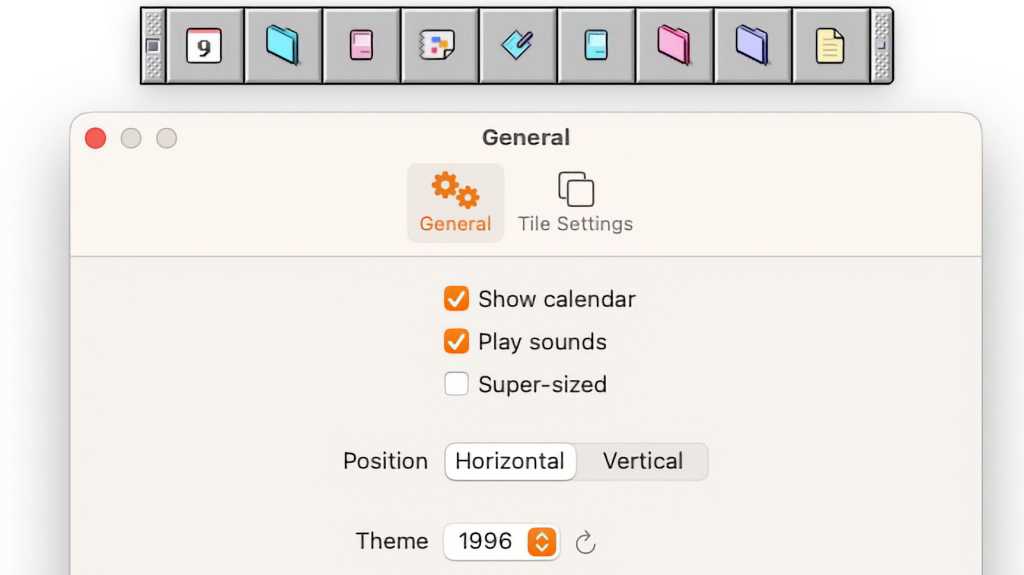
For example, I have placed my banking app Macgiro 14 on one button and the AI Mistral app Le Chat (which I use in Safari) on another. I added Pixelmator Pro and Mactracker as additional apps that I frequently use. Different icons can be selected for the respective applications or website destinations, which, in my case, are based on the classic Mac OS (1996), for example.
Alternatively, you can select other icon motifs from 1984 to 2024. The control bar can also be arranged horizontally or vertically, and, if you want, there is a button at the top or on the left that displays the current date. You can also set the display of a notepad (scratchpad) for tasks and reminders, as we know it from the classic Mac OS.
There is also the Super-Sized option, which makes the individual buttons significantly larger. The bar can also be shrunk or clicked away completely at any time. All these options can be found in a separate control panel for the settings–the app is only available with an English user interface.
Motorcycl3 Retrostrip
The icons are very generic, unlike in the classic Control Strip, where you could find a thumbnail reference to the linked control field (such as volume) or the application. With RetroStrip, you have to remember what you have set up. Even if you hover over the respective button with the pointer, it does not show which application or destination it is. Developer J. Blake Harris has revised the icons to make them more meaningful and also activated Apple’s classic tooltips, but I found that this only works unreliably or not at all.
IDG
RetroStrip is free; just download the RetroStrip LE package from the Purchase section of the website. You can also purchase additional icon themes, such as Next-Style or OS X (Aqua) from 2000. The individual additional themes are available for $2 each or you can buy all three of them for at once for $5. A Mac with Intel or Apple Silicon and at least macOS 15.2 is required.
This article originally appeared on our sister publication Macwelt and was translated and localized from German.
